
Getting started
A migration in three steps, extract, migrate and apply, followed by a walkthrough for each kind of deployment.
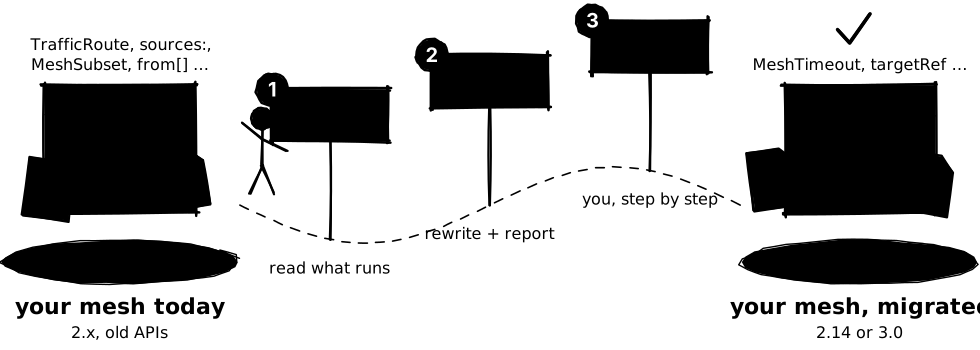
Your mesh holds resources written for older Kuma and Kong Mesh APIs: legacy policies,
MeshSubset selectors, from[] sections, fields that 3.0 drops. kuma-migrator rewrites them
for the version you are moving to. You run two commands. The third step, applying the result,
stays with you, and the report tells you exactly what to run.
Before you start
- kuma-migrator installed. Homebrew, a release archive or a source build: see Installation.
- Read access to the control plane. A
kubectlcontext for Kubernetes, akumactlcontext for Universal and Konnect. The tool only reads. No Konnect admin rights? Get a read-only token. - A target version.
--to-latest v2(the default) keeps you on the latest 2.x line,--to-latest v3prepares the move to 3.0. See Target versions.
Extract what runs today
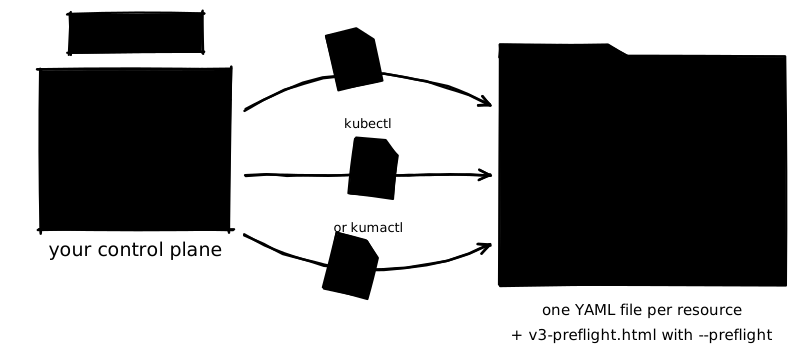
Point extract at a control plane. It lists every Kuma resource, through kubectl on
Kubernetes or kumactl on Universal and Konnect, and writes one YAML file per resource on your
machine, sorted by control plane, mesh and kind. Nothing changes in the control plane.
# Kubernetes: a kubectl context
kuma-migrator extract --kube-context prod-eks --output-dir ./raw-policies
# Universal or Konnect: a kumactl context
kuma-migrator extract --kumactl-context my-cp --output-dir ./raw-policies
You get raw-policies/<context>-<mode>-ctx/mesh-<mesh>/…, one file per resource
Multizone? Run extract once per control plane, Global and each zone, into the same
directory. Details: Extract.
Planning a 3.0 upgrade? Add --preflight to a --kumactl-context extraction to also audit
the running control plane: versions, settings, zones. See
Live control plane audit.
Let the tool rewrite them
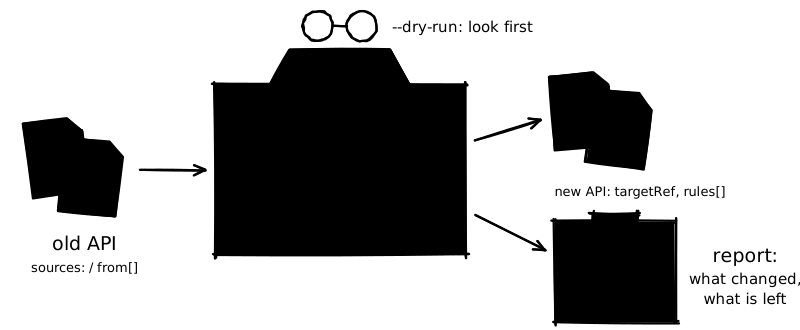
Start with a dry run: migrate --dry-run decides what to do with every file and writes only
the plan. Read it. When it looks right, run migrate for real. Each document is converted to
its successor, rewritten in place, copied unchanged, or set aside under _manual/ when it
cannot be converted safely.
kuma-migrator migrate --input-dir ./raw-policies --output-dir ./migrated --dry-run
less ./migrated/migration-plan.md
kuma-migrator migrate --input-dir ./raw-policies --output-dir ./migrated
Moving to 3.0? Add --to-latest v3 to both commands, and write to a separate directory.
Every file gets one line in the terminal:
| Mark | Meaning |
|---|---|
✓ LEGACY, SUBSET, RULES, … |
Converted. The label names the scenario that applied |
● ALREADY MIGRATED |
Already on the current API, copied unchanged |
◆ SCANNED |
Not a policy; the deprecation scan rewrote or flagged it |
– SKIP |
Nothing to do |
⚠ MANUAL, PARTIAL ERROR |
Some or all documents went to _manual/: finish them by hand |
✗ ERROR |
Not converted; the report says why and what to write instead |
You get migrated/ with the rewritten files, migration-report.md and _manual/
Details: Migrate, Output and reports.
Apply, following the report
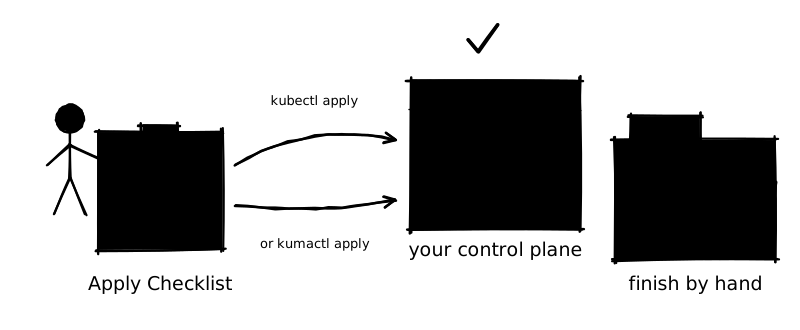
kuma-migrator never writes to a control plane. Open migrated/migration-report.md and work
down its Apply Checklist: one kubectl or kumactl command per directory or file, in an
order that works, with Mesh objects last.
kubectl --context prod-eks apply -f ./migrated/prod-eks-zone-ctx/mesh-default/resiliency/
kubectl --context prod-eks apply -f ./migrated/prod-eks-zone-ctx/mesh-default/routing/
# … the rest of the checklist, then the Mesh:
kubectl --context prod-eks apply -f ./migrated/prod-eks-zone-ctx/mesh-default/mesh/
Then:
- write by hand what the report lists under Kept Under
_manual/, using the reason given for each file; - check traffic, then delete the old resources listed under Original Resources to Delete.
You get a mesh on the new APIs, ready for 2.14 or for the 3.0 upgrade
Details: Apply. For a 3.0 upgrade, the checklist adds the steps to run before the Global control plane upgrade; see Upgrade plans.
Walkthroughs by setup
The same three steps on each kind of deployment, with real output. Pick yours:
- Kubernetes, single zone
One cluster,
kubectl - Multizone A Global and its zones
- Kong Mesh, self-hosted
Through
kumactl - Konnect Hosted Global control plane
- Universal
VMs and
kumactl
The context names below are examples. The migrate outputs shown were produced by running
the current release on input trees with the same layout; extract needs a live control plane
and is shown as commands only.
Kubernetes, single zone
One Kubernetes cluster running the control plane, extracted with kubectl.
kuma-migrator extract --kube-context prod-eks --output-dir ./raw-policies
kuma-migrator migrate --input-dir ./raw-policies --output-dir ./migrated --dry-run
less ./migrated/migration-plan.md
kuma-migrator migrate --input-dir ./raw-policies --output-dir ./migrated
What lands where:
raw-policies/
  prod-eks-zone-ctx/                ← KUMA_MODE=zone (single-zone since Kuma 2.6)
    .kuma-migrator.json             ← {"tool":"kubectl","cpMode":"zone","federated":false,…}
    mesh-default/
      resiliency/ routing/ zero-trust/ observability/ mesh/
migrated/
  prod-eks-zone-ctx/mesh-default/…  ← same layout, files named <Kind>-[<ns>-]<name>.yaml
  migration-plan.md
  migration-report.md
A single-zone control plane is a zone with no Global address, so extract reports
zone (…), not federated and applies no origin filter: every resource is extracted, labelled
or not. A control plane still configured with the older standalone mode is labelled
prod-eks-standalone-ctx and is also extracted without an origin filter. Kuma 3.0 removes
standalone: rename it to zone before upgrading. The directory name stays
-standalone-ctx, so earlier extracts remain valid input, and a --to-latest v3 report lists
the rename as blocking (see Upgrade plans).
What to review in the report:
- Action Items → Errors: documents that were not converted (for example
TrafficRoute). - Warnings on
Subsetconversions that useapp: <service>as a guessed Pod label. - Workload Service Address Mappings: env vars that address a service by its
kuma.io/servicename.
Apply with the commands from the report's Apply Checklist, Mesh last:
kubectl --context prod-eks apply -f ./migrated/prod-eks-zone-ctx/mesh-default/resiliency/
kubectl --context prod-eks apply -f ./migrated/prod-eks-zone-ctx/mesh-default/routing/
kubectl --context prod-eks apply -f ./migrated/prod-eks-zone-ctx/mesh-default/zero-trust/
kubectl --context prod-eks apply -f ./migrated/prod-eks-zone-ctx/mesh-default/observability/
# after every workload and policy is migrated:
kubectl --context prod-eks apply -f ./migrated/prod-eks-zone-ctx/mesh-default/mesh/
Then delete the originals listed under Original Resources to Delete.
Multizone: Global and zones
A Global control plane and two Zone control planes. Extract all three into the same directory; each gets its own context directory.
kuma-migrator extract --kube-context global-prod        --output-dir ./raw-policies
kuma-migrator extract --kube-context zone-eu-west1-prod --output-dir ./raw-policies
kuma-migrator extract --kube-context zone-us-east1-prod --output-dir ./raw-policies

kuma-migrator migrate --input-dir ./raw-policies --output-dir ./migrated --dry-run
kuma-migrator migrate --input-dir ./raw-policies --output-dir ./migrated
Use --kumactl-context for a Global control plane that runs on Universal (PostgreSQL store).
On 3.0 that is the only supported setup for a Global control plane
(Kuma UPGRADE.md).
The global-prod control plane above is Kubernetes-native, so a --to-latest v3 report on
this tree opens with a blocking Control Plane Topology section for it (see
Upgrade plans).
What each extraction gets:
| Context directory | Contains | Skipped, with the reason |
|---|---|---|
global-prod-global-ctx |
Every policy created on the Global control plane, Mesh objects, global-scoped resources |
Policies with kuma.io/origin: zone (listed with their zone), MeshGatewayInstance, MeshGatewayConfig |
zone-eu-west1-prod-zone-ctx |
Policies created on that zone, its MeshGatewayInstance/MeshGatewayConfig, gateways and routes created directly on the zone |
Everything synced from the Global control plane; resources with no kuma.io/origin label, listed after extraction |
zone-us-east1-prod-zone-ctx |
Same, for the other zone | Same |
The end of the Global extraction lists what to fetch from the zones:
  ⚠  Zone-origin resources skipped on Global CP — extract from their zone instead:
     MeshTimeout/my-timeout        →  zone: zone-eu-west1-prod
Output of migrate --dry-run on such a tree (Global and one zone, warnings shortened):
  ✓  MESH              default  default.yaml
       ←  global-prod-global-ctx/mesh-default/mesh/default.yaml
       →  global-prod-global-ctx/mesh-default/mesh/Mesh-default.yaml
  ✓  LEGACY            default  timeout-default.yaml
       ←  global-prod-global-ctx/mesh-default/resiliency/timeout-default.yaml
       →  global-prod-global-ctx/mesh-default/resiliency/MeshTimeout-backend-timeout.yaml
  ✓  SUBSET            default  meshretry.yaml
       ←  zone-eu-west1-prod-zone-ctx/mesh-default/resiliency/meshretry.yaml
       →  zone-eu-west1-prod-zone-ctx/mesh-default/resiliency/MeshRetry-demo-backend-retry.yaml
  ✓  RULES             default  meshtimeout.yaml
       ←  zone-eu-west1-prod-zone-ctx/mesh-default/resiliency/meshtimeout.yaml
       →  zone-eu-west1-prod-zone-ctx/mesh-default/resiliency/MeshTimeout-demo-backend-inbound.yaml
The Apply Checklist lists the Global context first, then each zone. Apply each context with
its own kubectl context: resources from global-prod-global-ctx go to the Global control
plane and are synced to the zones; resources from a zone context go back to that zone.
Gateway API output in global-scoped-resources/ goes to the Kubernetes cluster that runs the
gateway. See Multizone.
Kong Mesh, self-hosted, through kumactl
Use the Kong Mesh build of kumactl. Register the control plane once:
kumactl config control-planes add \
  --name kong-mesh-global \
  --address https://kong-mesh-global.example.com:5682 \
  --auth-type tokens --auth-conf token="$KONG_MESH_ADMIN_TOKEN"
Extract and migrate:
kuma-migrator extract --kumactl-context kong-mesh-global --output-dir ./raw-policies
kuma-migrator migrate --input-dir ./raw-policies --output-dir ./migrated --dry-run
kuma-migrator migrate --input-dir ./raw-policies --output-dir ./migrated
extract prints the environment it reads from GET /config. If it says kubernetes, the
control plane stores resources as CRDs:
- re-run with
--output-format kubernetes, or extract with--kube-contextinstead; - apply with
kubectl(see Apply).kumactlcannot create, update or delete resources that Kubernetes manages, so the report printskubectlcommands for such a context, says why, and names the kumactl context so you can pointkubectlat the right cluster.
Kong Mesh specifics show up in the same run: OPAPolicy becomes MeshOPA, AccessRole is
scanned for the 3.0 type changes, and enterprise CA backends (vault, acmpca,
cert-manager) are reported with the MeshIdentity provider that replaces them. See
MeshOPA and External PKI.
On Kong Mesh 3.0, GET /config needs the VIEW_CONTROL_PLANE_METADATA access type. Without
it, extract continues in unknown mode: no origin filter and the Kubernetes skip list.
Konnect
Konnect hosts the Global control plane. Copy the kumactl config control-planes add command
from the Konnect UI for the mesh control plane; it stores a personal access token as a header.
If you are not an admin of the organization, ask one to run the script from
kuma-migrator konnect token-script and use the read-only token it prints: see
Konnect read-only access.
kumactl config control-planes add \
  --name konnect-global-prod \
  --address "https://$KONNECT_REGION.api.konghq.com/v1/mesh/control-planes/$CONTROL_PLANE_ID/api" \
  --headers "authorization=Bearer $KONNECT_TOKEN"
kuma-migrator extract --kumactl-context konnect-global-prod --output-dir ./raw-policies
kuma-migrator migrate --input-dir ./raw-policies --output-dir ./migrated --dry-run
kuma-migrator migrate --input-dir ./raw-policies --output-dir ./migrated
extract detects Konnect from the api.konghq.com address, treats it as a Global control
plane, and reads meshes, zones and resources over HTTPS. The files are in Universal format.
.kuma-migrator.json records "isKonnect": true.
Output of migrate on a Konnect tree (warnings shortened):
  ●  ALREADY MIGRATED  default  MeshTrace-otel.yaml
       ←  konnect-global-prod-global-ctx/mesh-default/observability/MeshTrace-otel.yaml
       →  konnect-global-prod-global-ctx/mesh-default/observability/MeshTrace-otel.yaml
       ⚠  MeshTrace "otel": an inline openTelemetry.endpoint is deprecated in Kuma 2.14 and removed in 3.0 — …
  ✓  LEGACY            default  Retry-backend-retry.yaml
       ←  konnect-global-prod-global-ctx/mesh-default/resiliency/Retry-backend-retry.yaml
       →  konnect-global-prod-global-ctx/mesh-default/resiliency/MeshRetry-backend-retry.yaml
  ✓  EXTERNAL SERVICE  default  ExternalService-httpbin.yaml
       ←  konnect-global-prod-global-ctx/mesh-default/routing/ExternalService-httpbin.yaml
       →  konnect-global-prod-global-ctx/mesh-default/routing/MeshExternalService-httpbin.yaml
The Apply Checklist lists one kumactl apply per file:
kumactl config control-planes switch --name konnect-global-prod
kumactl apply -f migrated/konnect-global-prod-global-ctx/mesh-default/resiliency/MeshRetry-backend-retry.yaml
kumactl apply -f migrated/konnect-global-prod-global-ctx/mesh-default/routing/MeshExternalService-httpbin.yaml
kumactl apply -f migrated/konnect-global-prod-global-ctx/mesh-default/observability/MeshTrace-otel.yaml
The files are in Universal format, like the input, so kumactl apply takes them as they are.
Zones attached to Konnect run their own control planes. Extract each zone with
--kube-context (or --kumactl-context for a Universal zone) into the same directory to pick
up zone-origin policies and gateway instances.
Universal
Control planes and data planes on VMs, extracted with kumactl. extract records
"environment":"universal", so Dataplane, ZoneIngress and ZoneEgress are extracted and
scanned instead of skipped.
kuma-migrator extract --kumactl-context uni-global --output-dir ./raw-policies
kuma-migrator migrate --input-dir ./raw-policies --output-dir ./migrated --dry-run
  –  SKIP              ZoneIngress-zi-1.yaml: not a Kuma policy; copied unchanged
       ←  uni-global-global-ctx/global-scoped-resources/other/ZoneIngress-zi-1.yaml
       →  uni-global-global-ctx/global-scoped-resources/other/ZoneIngress-zi-1.yaml
  ◆  SCANNED           default  Dataplane-backend-01.yaml: not a policy; copied unchanged, see warnings
       ←  uni-global-global-ctx/mesh-default/other/Dataplane-backend-01.yaml
       →  uni-global-global-ctx/mesh-default/other/Dataplane-backend-01.yaml
       ⚠  Dataplane "backend-01": transparentProxying.reachableServices uses legacy kuma.io/service names ([redis]). …
  ✓  LEGACY            default  CircuitBreaker-backend.yaml
       ←  uni-global-global-ctx/mesh-default/resiliency/CircuitBreaker-backend.yaml
       →  uni-global-global-ctx/mesh-default/resiliency/MeshCircuitBreaker-backend-cb.yaml
No scenario applies to these kinds; the deprecation scan still runs on them. SCANNED means
it flagged or rewrote the document, SKIP that it found nothing. Under --to-latest v3 the
same tree produces more: inbound tags move to Dataplane labels and kuma.io/protocol to
inbound[].protocol (the Dataplane line then reads rewritten by the deprecation scan), and
the ZoneIngress goes to _manual/ as a kind 3.0 removes (labelled MANUAL).
Universal Dataplanes are usually generated by kuma-dp from a template on each VM, not
applied with kumactl. Apply the Dataplane changes to those templates. See
Dataplanes.
Re-running
extract and migrate are safe to re-run. Use a fresh output directory per run and per
target (./migrated-v2, ./migrated-v3): migrate does not delete files a previous run left
in the same directory.